Network Rack Cabinet Guide for Small Businesses: Prevent Downtime & Improve IT Infrastructure
Prevent downtime and organize your IT infrastructure with our small business guide to network rack cabinets. Learn how to choose, install, and protect your gear.
Walk into the back room of many small businesses and you'll often find a risky setup: tangled cables, switches stacked with no airflow, and critical network equipment sitting unsecured on shelves.
It may seem harmless, until your network goes down. If you've experienced recent outages, have equipment scattered on desks, or struggle to troubleshoot a messy IT closet, it's time for an upgrade.
At All-In Information Technology (AIT), we regularly respond to preventable outages caused by poor infrastructure design. The simple, permanent solution is installing a properly designed network rack cabinet.
What Is a Network Rack Cabinet?
A network rack cabinet (also known as a server rack enclosure) is a structured, lockable system used to mount, organize, and protect your core IT equipment.
It is designed to securely hold:
- Network switches
- Routers and firewalls
- Patch panels
- UPS (battery backup systems)
- Servers and NAS devices
The Risks of a Messy Setup vs. The Value of a Cabinet
Ignoring infrastructure organization leads to serious business disruptions. By upgrading to a structured cabinet, you immediately solve several major operational and security risks.
| The Risk (Without a Cabinet) | The Reward (With a Cabinet) |
|---|---|
| Overheating & Failure: Stacked hardware lacks ventilation, causing it to degrade and fail prematurely. | Optimized Cooling: Ventilated panels and fans manage heat, extending hardware lifespan. |
| Accidental Downtime: Unsecured, tangled cables are easily bumped or unplugged in active work areas. | Uptime & Efficiency: Clean, labeled cable routing prevents accidents and ensures stable connectivity. |
| Security & Compliance Threats: Exposed equipment is vulnerable to tampering, failing HIPAA, SOC 2, or PCI-DSS audits. | Physical Security: Locking doors restrict access to authorized personnel only. |
| Slow Troubleshooting: Disorganized setups make IT support incredibly time-consuming and expensive. | Centralized Management: A clean layout makes maintenance, upgrades, and troubleshooting incredibly fast. |
In many cases, preventing a single major outage offsets the entire cost of the rack installation.
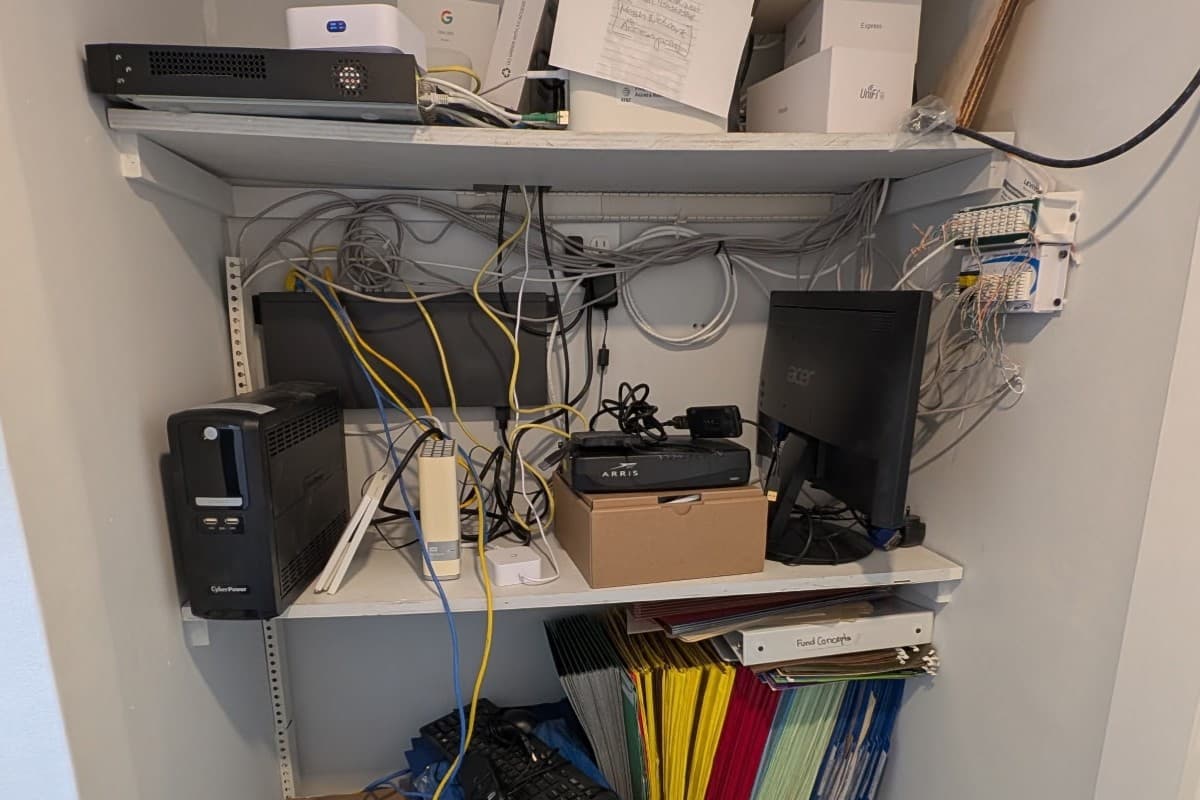
Before: Tangled cables, no airflow, unsecured equipment
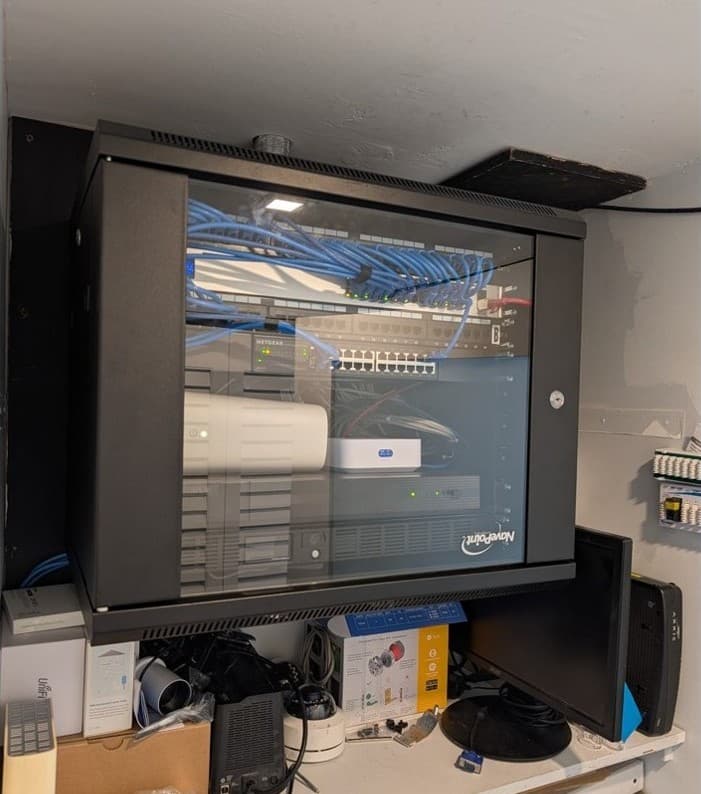
After: Organized, ventilated, and secured in a rack cabinet
How to Choose the Right Rack Enclosure
Selecting the right network rack cabinet depends heavily on your current environment and future growth plans.
1. Rack Size (U Height)
Cabinets are measured in rack units (U). Always choose a cabinet that fits your current equipment while leaving extra space for future expansion:
- Small offices: 9U–15U
- Growing environments: 18U–27U
- Larger deployments: 36U–42U
2. Wall-Mount vs. Floor-Standing
Wall-mounted racks are ideal for limited floor space and smaller network switch setups.
Floor-standing cabinets are required for heavier equipment (like large UPS batteries or full servers) and significant future growth.
What Does a Professional Installation Include?
At All-In IT, our installation services are designed for long-term reliability. We handle the entire process, including:
- Site Assessment: Evaluating your equipment, space, power, and cooling needs.
- Design & Specification: Sourcing the correct cabinet and supporting hardware.
- Mounting & Cable Management: Securely racking the gear and routing/labeling all cables for a pristine finish.
- Ongoing Support: Providing documentation and managed IT services to keep your network running flawlessly.
Professional Network Rack Installation in Fort Lauderdale
A cluttered network setup sends the wrong message to clients and auditors while putting your operations at risk. All-In Information Technology (AIT) provides professional network rack cabinet installation services in Fort Lauderdale and surrounding areas.
We'll assess your current setup and recommend the best solution, with no pressure, just expert guidance.
Schedule a free consultation or call us at (888) 992-3044.
Frequently Asked Questions
What's the difference between a network rack and a network cabinet?
A network rack is an open metal frame used to mount equipment, while a network cabinet is fully enclosed with locking doors and side panels. Cabinets provide added physical security, better airflow control, and a cleaner, more professional appearance.
Do small businesses really need a server rack?
Yes. Even small businesses benefit if they have three or more network devices. It reduces downtime, organizes messy cables, and prevents expensive hardware from overheating or being accidentally unplugged.
How much does a network rack installation cost?
Costs vary based on the cabinet size (U height), the amount of equipment being mounted, and the complexity of the cable management. However, businesses generally find that the investment pays for itself by preventing costly downtime and extending the lifespan of their hardware.
All-In IT provides managed IT services, cybersecurity, and infrastructure solutions for businesses in Fort Lauderdale and across South Florida.
Need Help With This?
We can help you implement these solutions for your business.
Schedule a Free Call